
What is a Motherboard?
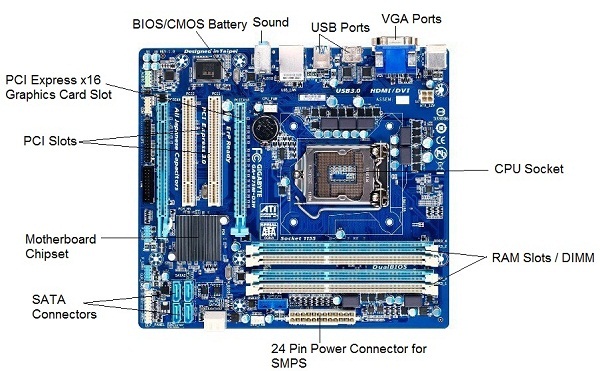
The motherboard is at the center of what makes a PC work. It houses the CPU and is a hub that all other hardware runs through. The motherboard acts as a brain; allocating power where it’s needed, communicating with and coordinating across all other components – making it one of the most important pieces of hardware in a computer.
When choosing a motherboard, it’s important to check what hardware ports the motherboard supplies. It’s vital to check how many USB ports, and what grade (USB 2.0, 3.0, 3.1) they are, as well as what display ports are used (HDMI, DVI, RGB) and how many of each there are. The ports on the motherboard will also help you define what other hardware will be compatible with your computer, such as what type of RAM and graphics card you can use.
Although the motherboard is just one piece of circuitry, it is home to another one of the most important pieces of hardware: the processor
UNIQUE IDENTIFIERS OF NETWORK
Host name:
Each device in the network is associated with a unique device name known as Hostname.
Type “hostname” in the command prompt and press ‘Enter’, this displays the hostname of your machine.
IP Address (Internet Protocol address):
Also know as Logical Address, is the network address of the system across the network.
To identify each device in the world-wide web, Internet Assigned Numbers Authority (IANA) assigns IPV4 (Version 4) address as unique identifier for each device on the Internet.
Length of the IP address is : 32-bits. (Hence we have 232 ip addresses available.)
Type “ipconfig” in the command prompt and press ‘Enter’, this gives us the IP address of the device.
MAC Address (Media Access Control address):
Also known as physical address, is the unique identifier of each host and is associated with the NIC (Network Interface Card).
MAC address is assigned to the NIC at the time of manufacturing.
Length of the MAC address is : 12-nibble/ 6 bytes/ 48 bits
Type “ipconfig/all” in the command prompt and press ‘Enter’, this gives us the MAC address.
Port:
Port can be referred as logical channel through which data can be sent/received to an application. Any host may have multiple applications running, and each of this application is identified using the port number on which they are running on.
Port number is a 16-bit integer, hence we have 216 ports available which are categorized as shown below:
| PORT TYPES | RANGE |
|---|---|
| Well known Ports | 0 – 1023 |
| Registered Ports | 1024 – 49151 |
| Ephemeral Ports | 49152 – 65535 |
Number of ports: 65,536
Range: 0 – 65535
Type “netstat -a” in the command prompt and press ‘Enter’, this lists all the ports being used.
Socket:
The unique combination of IP address and Port number together are termed as Socket.
Few more concepts
DNS Server:
DNS stands for Domain Name system.
DNS is basically a server which translate web addresses or URL (ex: www.google.com) into their corresponding IP addresses. We don’t have to remember all the IP addresses of each and every website.
The command ‘nslookup’ gives you the IP address of the domain you are looking for. This also provides the information of our DNS Server.
ARP:
ARP stands for Address Resolution Protocol.
It is used to convert the IP address to its corresponding Physical Address(i.e.MAC Address).
ARP is used by the Data Link Layer to identify the MAC address of the Receiver’s machine.
RARP:
RARP stands for Reverse Address Resolution Protocol.
As the name suggest, it provides the IP address of the a device given physical address as input. But RARP has become obsolete since the time DHCP has come into picture.
This article is contributed by Kundana Thiyari. If you like GeeksforGeeks and would like to contribute, you can also write an article using contribute.geeksforgeeks.org or mail your article to contribute@geeksforgeeks.org. See your article appearing on the GeeksforGeeks main page and help other Geeks.
Please write comments if you find anything incorrect, or you want to share more information about the topic discussed above